
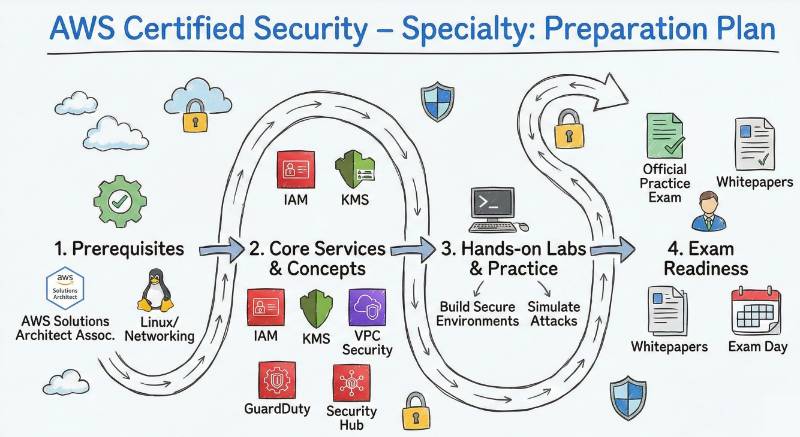
In today’s cloud-first world, security is more important than ever. As organizations increasingly shift their operations to the cloud, protecting their data and infrastructure becomes a critical responsibility. The AWS Certified Security – Specialty certification offers an opportunity for professionals to validate their skills in securing Amazon Web Services (AWS) environments, a key area in cloud security.
This comprehensive guide will walk you through everything you need to know about the AWS Certified Security – Specialty certification, from preparation strategies to post-certification career growth. By the end of this guide, you will have a solid understanding of the certification requirements, benefits, and how to navigate your AWS security learning path.
What is AWS Certified Security – Specialty?
The AWS Certified Security – Specialty certification is an advanced-level certification offered by Amazon Web Services (AWS) that focuses on cloud security. This certification is designed for professionals who specialize in securing AWS cloud environments. The exam evaluates your knowledge in several key security areas, including identity and access management (IAM), data protection, network security, incident response, and compliance within AWS.
This certification ensures that you have the skills to manage and secure AWS resources while maintaining compliance with industry standards and best practices.
Who Should Take This Certification?
The AWS Certified Security – Specialty certification is ideal for professionals who already have some experience with AWS and want to specialize in cloud security. It is most beneficial for:
- Security Engineers
- Cloud Architects
- DevSecOps Engineers
- AWS Cloud Professionals
- Compliance and Risk Managers
If you’re responsible for securing AWS environments or managing cloud security at an organization, this certification will help you deepen your knowledge and strengthen your security practices.
Skills You’ll Gain
By earning the AWS Certified Security – Specialty certification, you will gain expertise in several areas of cloud security, including:
- Identity and Access Management (IAM): Create and manage IAM policies and roles to control access to AWS services securely.
- Data Protection: Implement encryption and key management practices using AWS KMS and other AWS security tools.
- Network Security: Configure and secure VPCs, subnets, security groups, and NACLs (Network Access Control Lists).
- Incident Response: Detect, respond to, and mitigate security incidents using AWS security services.
- Compliance: Ensure that your AWS environment meets industry security standards such as SOC 2, PCI-DSS, and GDPR.
- Monitoring and Logging: Set up logging and monitoring using AWS CloudTrail, GuardDuty, and CloudWatch to identify and address security threats in real-time.
Real-World Projects You Should Be Able to Do
After completing the AWS Certified Security – Specialty certification, you should be able to handle the following real-world tasks:
- Design and implement IAM policies for AWS services, ensuring proper access control.
- Encrypt sensitive data using AWS KMS and implement encryption practices for data at rest and in transit.
- Secure a VPC by configuring subnets, security groups, and NACLs for optimal network security.
- Set up incident response protocols to detect and mitigate AWS security incidents efficiently.
- Ensure compliance with industry regulations by applying security controls and best practices in AWS.
- Monitor security events and respond to threats using CloudTrail, GuardDuty, and CloudWatch.
Preparation Plan
7-14 Days (Quick Overview)
- Get familiar with the exam objectives and AWS security tools.
- Focus on IAM, KMS, and CloudTrail basics.
- Review AWS security best practices and AWS whitepapers.
30 Days (Intermediate Plan)
- Dive deeper into data protection, network security, and incident response.
- Set up practice labs for IAM, encryption, and network security.
- Take mock exams to identify your weak areas.
60 Days (Comprehensive Study)
- Create a mock AWS environment and practice securing it.
- Focus on security compliance frameworks (SOC 2, HIPAA, GDPR).
- Take practice exams and work on hands-on labs to solidify your knowledge.
Common Mistakes
Here are some common mistakes to avoid during your preparation:
- Not understanding IAM deeply: IAM is critical for managing AWS access securely; ensure you understand roles, policies, and permissions.
- Skipping encryption practices: Failing to implement encryption for data can leave your environment vulnerable.
- Ignoring security monitoring: Not using CloudTrail and GuardDuty for monitoring can result in undetected security incidents.
- Lack of hands-on practice: Without practical experience in AWS, theoretical knowledge may not be enough to pass the exam.
- Neglecting compliance standards: Ensuring compliance with industry standards like GDPR and HIPAA is essential for securing your environment.
Best Next Certification After This
Once you complete the AWS Certified Security – Specialty, consider pursuing one of the following certifications to further specialize your skills:
- AWS Certified Solutions Architect – Professional: Ideal for those who want to deepen their architecture skills.
- Certified Cloud Security Professional (CCSP): A broader certification that focuses on cloud security across multiple platforms.
- AWS Certified Advanced Networking – Specialty: Perfect for those interested in specializing in network security and cloud connectivity.
Choose Your Path
After completing the AWS Certified Security – Specialty, you can explore several learning paths to continue expanding your skills. These learning paths align with different areas of expertise in cloud security and operations:
DevOps Learning Path
- Learn how to automate security processes and ensure continuous security throughout the development pipeline.
DevSecOps Learning Path
- Integrate security throughout the DevOps lifecycle and automate security tests during software development.
SRE Learning Path (Site Reliability Engineering)
- Focus on building secure, reliable, and scalable AWS systems while ensuring high availability and performance.
AIOps/MLOps Learning Path
- Secure AI/ML models and automate security monitoring and incident response in AI-driven environments.
DataOps Learning Path
- Secure data pipelines, protect sensitive data, and ensure compliance in cloud data environments.
FinOps Learning Path
- Learn to manage cloud costs securely and ensure financial security in cloud financial operations.
Role → Recommended Certifications
| Role | Recommended Certifications |
|---|---|
| Security Engineer | AWS Certified Security – Specialty, AWS Solutions Architect |
| Cloud Engineer | AWS Certified Security – Specialty, AWS Developer |
| Platform Engineer | AWS Certified Security – Specialty, AWS SysOps Admin |
| DevSecOps Engineer | AWS Certified Security – Specialty, Certified Kubernetes Security Specialist |
| Data Engineer | AWS Certified Big Data Specialty, AWS Certified Security – Specialty |
| Engineering Manager | AWS Certified Security – Specialty, AWS Solutions Architect |
Frequently Asked Questions
1. What are the benefits of earning the AWS Certified Security – Specialty certification?
Earning this certification validates your expertise in securing AWS cloud environments, which can improve job prospects, increase earning potential, and position you as a cloud security expert.
2. How does the AWS Certified Security – Specialty differ from other AWS certifications?
The AWS Certified Security – Specialty focuses specifically on cloud security, whereas other AWS certifications (like Solutions Architect) cover broader AWS service design and management concepts.
3. Do I need to have an AWS Solutions Architect certification before attempting the AWS Certified Security – Specialty exam?
No, there is no requirement to hold an AWS Solutions Architect certification before taking the AWS Certified Security – Specialty exam. However, familiarity with AWS services like IAM, VPC, and KMS will help.
4. How is the AWS Certified Security – Specialty exam scored?
The exam is scored on a scale of 100 to 1000 points. A passing score is typically 750 out of 1000, though AWS doesn’t publicly disclose the exact passing score.
5. Can I use a calculator or other tools during the exam?
No, the AWS Certified Security – Specialty exam does not allow the use of external tools like calculators. However, the online exam interface includes a built-in notepad to make temporary notes during the exam.
6. Are there any practice exams available for the AWS Certified Security – Specialty certification?
Yes, AWS offers practice exams to help you familiarize yourself with the exam format and types of questions. You can also find third-party practice tests from training providers like DevOpsSchool and Cotocus.
7. What is the best way to prepare for the AWS Certified Security – Specialty exam?
A combination of studying AWS documentation, security whitepapers, hands-on labs, and mock exams is recommended for thorough preparation. Training courses from trusted providers like ScmGalaxy or BestDevOps can help guide your study process.
8. How much experience do I need before attempting the exam?
It is recommended to have at least two years of hands-on experience securing AWS environments. This includes understanding AWS services such as IAM, GuardDuty, and CloudTrail.
9. Is the exam multiple-choice only, or does it have other question types?
The exam consists solely of multiple-choice questions. Some questions may have multiple correct answers, but the exam does not include other question formats like essays or practical tasks.
10. Can I take the AWS Certified Security – Specialty exam in languages other than English?
Yes, the exam is available in multiple languages, including English, Japanese, Korean, and Simplified Chinese. Make sure to select your preferred language when scheduling the exam.
11. How do I schedule the AWS Certified Security – Specialty exam?
You can schedule the exam through the AWS Certification portal, where you can select your exam date, time, and location (online or at an authorized testing center).
12. What resources can I use to deepen my understanding of AWS security?
To deepen your knowledge, use resources like AWS security whitepapers, AWS training and certification, AWS security blog posts, and online platforms like Udemy, LinkedIn Learning, and AWS re:Invent sessions.
Frequently Asked Questions on AWS Certified Security – Specialty
1. How long does it take to complete the AWS Certified Security – Specialty exam?
The exam consists of 65 multiple-choice questions, and you have 170 minutes to complete it. This gives you enough time to carefully read through questions and manage your time effectively.
2. Do I need prior AWS certifications to take the AWS Certified Security – Specialty exam?
No, there are no mandatory prerequisites for this certification. However, it’s recommended to have a basic understanding of AWS services and cloud security fundamentals to ensure you are prepared.
3. How does AWS validate cloud security with this certification?
The exam validates your expertise in various security aspects of AWS, including identity and access management, data protection, network security, and incident response. It ensures that you understand AWS’s native security services and can apply them in real-world scenarios.
4. What are the most important AWS services to focus on for the certification?
Key services to focus on include IAM (Identity and Access Management), KMS (Key Management Service), CloudTrail, GuardDuty, VPC (Virtual Private Cloud), and CloudWatch. These tools are essential for securing AWS environments and understanding their role in security management.
5. Can I take the exam if I have no hands-on AWS experience?
It is highly recommended to have hands-on experience with AWS security services. While you can take the exam without extensive hands-on experience, practical knowledge of services like IAM, VPC, and GuardDuty will significantly improve your chances of success.
6. Are there any discounts available for the AWS Certified Security – Specialty exam?
AWS occasionally offers discounts or promotional offers for certification exams. You can check the AWS Certification website for any active promotions or discounts on exam fees.
7. How do I register for the AWS Certified Security – Specialty exam?
You can register for the exam through the AWS Certification portal. After creating an account, you can choose the exam date, time, and location (online proctoring is available).
8. What kind of career roles can benefit from this certification?
Roles that benefit from the AWS Certified Security – Specialty certification include Security Engineers, Cloud Architects, Compliance Managers, DevSecOps Engineers, Network Security Professionals, and AWS Cloud Engineers. The certification helps professionals specialize in securing cloud environments and improving overall security posture.
Next Certifications to Take
Same Track:
- AWS Certified Solutions Architect – Professional
Cross-Track:
- Certified Cloud Security Professional (CCSP)
Leadership Track:
- AWS Certified Advanced Networking – Specialty
Top Institutions Offering AWS Certified Security – Specialty Training
DevOpsSchool
DevOpsSchool specializes in AWS security training with a focus on real‑world application. Their program includes hands‑on labs, real examples of AWS security setups, and instructor‑led sessions to help you master key areas such as IAM, data protection, and incident response.
Cotocus
Cotocus offers practical AWS security certification training designed around real industry use cases. Their curriculum covers crucial areas like identity management, secure networking, encryption, and compliance, with interactive labs to reinforce learning.
ScmGalaxy
ScmGalaxy provides comprehensive AWS security certification training that combines theory with hands‑on practice. Their training focuses on AWS security tools like CloudTrail, GuardDuty, and KMS, helping you gain both knowledge and practical skills.
BestDevOps
BestDevOps offers flexible AWS security training options, including self‑paced and instructor‑led programs. Their course emphasizes secure architecture design, threat detection, and cloud compliance, preparing you to handle security challenges confidently.
devsecopsschool.com
DevSecOpsSchool focuses on integrating security into the DevOps lifecycle. Their AWS security training emphasizes building secure pipelines, automating security controls, and applying continuous monitoring practices in AWS environments.
sreschool.com
SRESchool blends Site Reliability Engineering practices with cloud security principles. Their training covers secure system design, automation of incident response, and resilience best practices to ensure reliable and secure AWS operations.
aiopsschool.com
AIOpsSchool offers AWS security training with an emphasis on AI‑driven operational intelligence. Their courses focus on automated threat detection, anomaly analysis, and proactive security monitoring in cloud settings.
dataopsschool.com
DataOpsSchool specializes in securing cloud‑based data environments. Their AWS security training focuses on protecting data pipelines, enforcing encryption, and managing compliance in data‑driven workloads.
finopsschool.com
FinOpsSchool combines cloud cost optimization with security best practices. Their AWS security training teaches you how to balance financial efficiency with robust security measures, ensuring secure and cost‑effective cloud operations.
Conclusion
The AWS Certified Security – Specialty certification is a crucial credential for professionals looking to specialize in securing AWS cloud environments. As cloud security continues to be a top priority for businesses worldwide, having this certification showcases your ability to effectively manage and safeguard AWS services. By earning this certification, you validate your expertise in identity management, data protection, network security, and compliance, all of which are essential in today’s cloud-driven world.
With comprehensive training options available from institutions like DevOpsSchool, Cotocus, ScmGalaxy, and others, you are well-equipped to gain the practical skills and knowledge needed for exam success. The combination of hands-on labs, expert mentorship, and real-world scenarios will ensure you’re fully prepared not only for the exam but also for tackling security challenges in your career.

