Introduction
Running a vehicle rental business takes more than finding customers. Owners must track bookings, check vehicle availability, manage payments, and plan maintenance. These tasks become harder when records sit in different places.
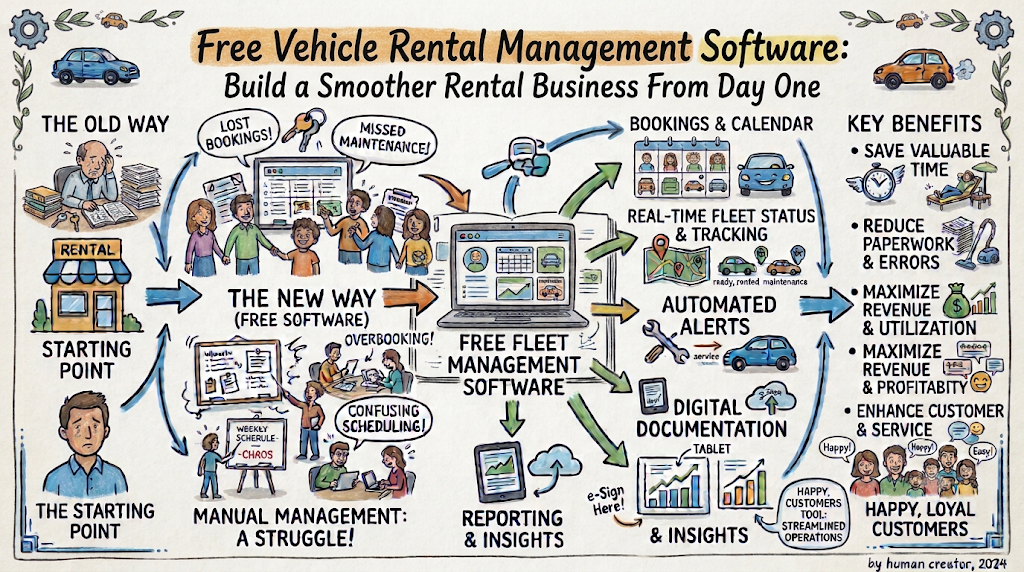
Free vehicle rental management software can bring many daily tasks together. It helps small businesses organize information and reduce manual work. However, every free plan offers different features. Owners should compare tools before choosing one.
This guide explains how rental software works. It also covers useful features, costs, and practical steps for small rental businesses.
Why Small Rental Businesses Need Better Systems
Many rental owners start with notebooks or spreadsheets. These tools work when the fleet stays small. But problems can appear as bookings increase.
A missed update may cause two customers to request the same vehicle. An unclear payment record can create confusion. Missing service notes can also affect vehicle safety.
A digital system helps owners manage these details in one place.
It can help businesses:
- Check vehicle availability before confirming bookings.
- Store customer and rental details.
- Record payments and deposits.
- Track vehicle service dates.
- Review upcoming reservations.
- Monitor rental income.
- Reduce repeated data entry.
The right system should match the size and needs of the business.
What to Check Before Choosing Free Software
Do not select software based only on its price. First, understand how your rental business works. Then compare the available features.
Look for these important points:
- Fleet size: Check how many vehicles the free plan supports.
- Booking limits: Review monthly booking restrictions.
- Customer records: Confirm that the system stores useful rental details.
- Payment tracking: Check how it records deposits and balances.
- Reports: Look for basic income and booking summaries.
- User access: See whether you can add staff members.
- Data export: Check whether you can download business records.
- Customer support: Review the help options available to free users.
A free plan may limit important features. Read the terms before moving your records.
Keep Vehicle Details Accurate
Every vehicle needs a clear digital record. This helps owners understand which vehicles they can offer.
Add useful information for each vehicle:
- Vehicle registration details.
- Make, model, and vehicle type.
- Daily or hourly rental price.
- Current availability.
- Insurance and document dates.
- Mileage and condition.
- Service and repair history.
- Photos and rental rules.
You can manage cars, motorcycles, bikes, and scooters through suitable rental tools. However, check whether the software supports your vehicle categories.
Accurate records also help staff answer customer questions. They can check details without searching through old files.
Prevent Booking Conflicts
Booking mistakes can damage customer trust. A reliable vehicle rental booking system helps owners manage reservation dates.
The system should show when each vehicle remains available. It should also display confirmed and pending bookings.
A simple booking process can follow these steps:
- Receive a customer request.
- Check the selected vehicle.
- Review the requested rental dates.
- Confirm availability.
- Record the agreed rental price.
- Share the booking details.
- Update the vehicle calendar.
Owners should also record cancellations and booking changes. This keeps availability information accurate.
Choose Software for Your Vehicle Type
Different rental businesses need different tools. A car rental company may need features that a scooter rental owner rarely uses.
| Rental business | Useful software features |
|---|---|
| Car rental | Vehicle records, booking calendar, deposits, and return checks |
| Motorcycle rental | Rider details, vehicle condition, service records, and rental agreements |
| Bike rental | Quick reservations, pickup times, and return tracking |
| Scooter rental | Short-term bookings, availability, and maintenance logs |
| Mixed fleet | Multiple vehicle categories and shared booking records |
Free car rental software may suit businesses with a small car fleet. Bike rental software may focus on quick reservations and short rental periods. Scooter rental software can help operators manage frequent daily bookings.
Choose a system that supports your actual rental process.
Organize Customer Information
Customer records help rental owners provide better service. They also make repeat bookings easier to manage.
A useful customer profile may include:
- Customer name and contact details.
- Booking history.
- Rental dates.
- Payment status.
- Vehicle details.
- Agreed rental conditions.
- Important communication notes.
Only collect information that your business needs. Protect customer records with suitable access controls.
For European businesses, GDPR rules also matter. Review your data collection, storage, and retention practices. Seek qualified advice when you need help with legal duties.
Track Payments Without Confusion
Payment records should match each booking. This helps owners understand which customers have paid.
A rental business may need to track:
- Booking advances.
- Security deposits.
- Remaining balances.
- Additional rental days.
- Late return charges.
- Damage-related costs.
- Refunds and cancellations.
Some free tools offer payment tracking but do not process payments. Others may connect with payment services through paid plans.
Check the difference before choosing a platform. Also, keep clear records of every transaction.
Compare Free Plans With Paid Options
Free software can help a new rental business control basic tasks. But growing operations may need more features.
| Area | Free plan | Paid plan |
|---|---|---|
| Vehicle records | Often includes basic records | May offer advanced fleet tools |
| Booking management | May have booking limits | May support larger booking volumes |
| Reports | Basic summaries may be available | May include detailed reports |
| Staff accounts | May allow limited users | May support more team members |
| Support | May offer basic help | May include faster support |
| Integrations | Often limited | May provide more connections |
These features vary by provider. Some platforms offer different limits and pricing models.
Before upgrading, calculate the value of each feature. Do not pay for tools your business does not need.
Use Maintenance Records to Protect Your Fleet
Vehicle maintenance affects safety and business costs. A rental owner should track every important service task.
Keep records of:
- Routine inspections.
- Oil and fluid changes.
- Tyre condition.
- Brake checks.
- Battery health.
- Repairs and replacements.
- Next service dates.
Motorcycle and scooter owners should also check helmets and other rental equipment. Record any damage before and after each rental.
A maintenance calendar helps owners plan service work. It also reduces the chance of offering a vehicle that needs attention.
Understand Rental Prices Across Europe
Vehicle rental prices vary across European destinations. The vehicle type, season, location, and rental period all affect the final cost.
For example, motorcycle rental cost Europe can change between popular tourist areas and smaller towns. Demand may also rise during summer holidays and major events.
Owners should consider these factors when setting prices:
- Vehicle purchase and maintenance costs.
- Insurance and operating expenses.
- Local customer demand.
- Seasonal booking patterns.
- Rental duration.
- Delivery or collection costs.
- Security deposit requirements.
Compare similar local listings before setting your rates. Keep prices clear so customers understand what they will pay.
Use Reports to Understand Business Performance
Reports help owners make better decisions. They show which vehicles attract bookings and where the business loses money.
Useful reports may include:
- Total bookings by month.
- Rental income by vehicle.
- Vehicle utilization.
- Cancellation numbers.
- Outstanding payments.
- Maintenance expenses.
- Repeat customer activity.
For example, a vehicle with low bookings may need a price review. A vehicle with frequent repairs may create high running costs.
Review reports regularly. Use the results to improve your fleet and rental process.
Support Peer-to-Peer Vehicle Rentals
Not every rental business owns a large fleet. Some owners rent out personal vehicles when they do not use them.
A peer-to-peer motorcycle rental Europe model connects vehicle owners with people who need temporary transport. It can create another option for travelers and local riders.
People who want to rent out my motorcycle should first review local rules, insurance terms, safety requirements, and platform conditions. They should also prepare clear rental terms.
The same approach applies to owners who want to list my car for rent. Vehicle condition, customer checks, and proper records remain important.
Online marketplaces can help owners reach potential renters. For example, motosharego.eu provides a marketplace for vehicle rental discovery across Europe. Owners and renters should review each listing and its terms before making an arrangement.
Protect Your Records and Daily Operations
Rental software stores important business information. Owners should take basic steps to protect it.
Follow these practices:
- Use strong passwords.
- Give staff access only to needed records.
- Enable two-step verification when available.
- Review account activity.
- Export important records regularly.
- Check the provider’s backup policy.
- Remove access when staff leave.
- Read the provider’s privacy terms.
Do not assume every free platform offers the same security features. Check its policies before storing customer information.
Common Mistakes to Avoid
A low price does not always mean a good choice. Some software may not support your daily work.
Avoid these common mistakes:
- Choosing software without checking its limits.
- Ignoring mobile access.
- Keeping old records in separate files.
- Forgetting to update vehicle availability.
- Skipping maintenance records.
- Overlooking payment and refund tracking.
- Ignoring data export options.
- Buying advanced features too early.
- Failing to test the booking process.
Test the software with a few sample vehicles first. Ask staff to try the main tasks. Make sure everyone can use the system comfortably.
Frequently Asked Questions
What is free vehicle rental management software?
It is a digital tool that helps rental businesses manage vehicles, bookings, and customer records. Free plans may include basic features with certain limits.
Can a small rental business use free software?
Yes. A small business can start with a free plan if it supports the required tasks. Owners should check booking, fleet, and user limits.
Does free rental software prevent double bookings?
Some platforms provide availability calendars and booking controls. These features can reduce booking conflicts when staff update records correctly.
Is free car rental software suitable for motorcycles?
Not always. Some platforms focus on cars, while others support several vehicle types. Check the available categories before signing up.
What should motorcycle rental software include?
It should support vehicle records, bookings, customer details, maintenance notes, and payment tracking. Rental businesses should also manage safety checks and agreements.
Can I manage scooters and bikes with one system?
Yes, if the software supports multiple vehicle categories. Check whether it can manage different prices, rental periods, and availability rules.
What affects motorcycle rental cost Europe?
Location, season, motorcycle model, rental duration, insurance, and demand can affect prices. Extra services may also change the total cost.
Can I rent out my motorcycle through an online marketplace?
Some marketplaces connect vehicle owners with potential renters. Review the platform’s rules, insurance conditions, and local requirements before listing.
When should I move from free to paid software?
Consider an upgrade when your booking volume grows or free-plan limits affect daily work. Compare the extra cost with the time and value you gain.
How can I keep rental customer data safe?
Use strong passwords, limited staff access, secure backups, and clear data policies. Collect only the details your business needs.
Final Thoughts
A rental business needs clear records and reliable daily processes. Free vehicle rental management software can help owners organize bookings, customers, payments, and vehicle details.
Start with the tasks that take the most time. Test a few suitable platforms before choosing one. Check every free-plan limit and future cost.
As your business grows, review your needs again. The best system is one that supports your fleet, saves time, and makes rentals easier to manage.