Introduction
A new job brings questions, plans, and many first steps. Employees want to know what to expect. Managers want new team members to learn their roles. HR teams must make sure every joining task moves forward.
Without a clear process, important details can get lost. One team may wait for documents. Another may forget equipment preparation. Managers may miss early feedback meetings. These gaps can make the first few weeks harder.
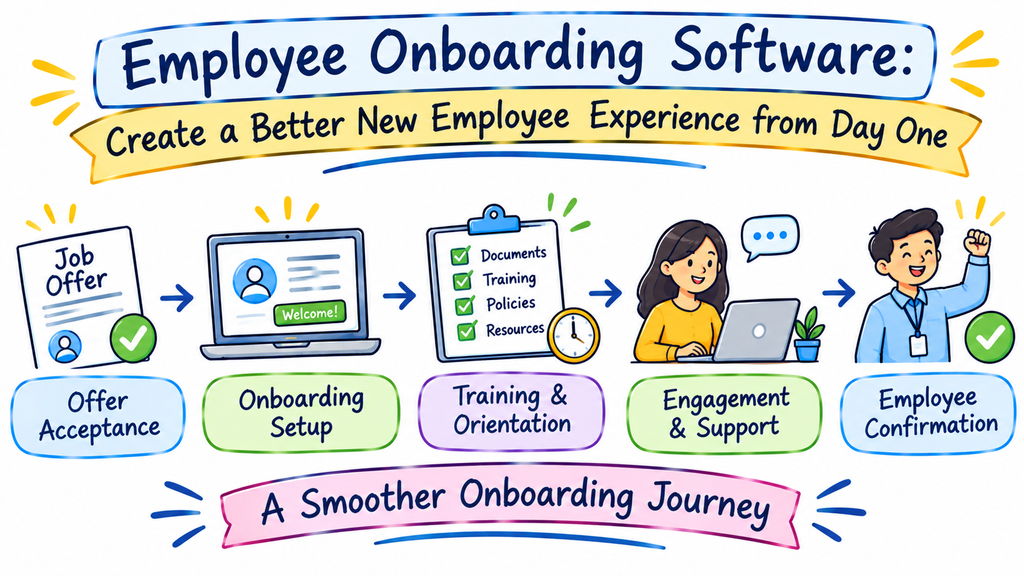
Employee Onboarding Software helps companies organize the full journey. It connects offer activities, preboarding, joining tasks, progress reviews, and confirmation steps. HR teams can create a clear process while employees understand what comes next.
Start with the Employee Experience
Before choosing a workflow, think about the new employee’s needs. A new hire should know where to go, whom to contact, and what to complete. They should also understand their role and early goals.
HR teams can improve the experience by making each step easy to follow. Avoid long instructions and unclear task names. Share important information at the right time. Give employees a clear way to ask questions.
A helpful onboarding experience should provide:
- Clear joining instructions
- Easy access to required documents
- A simple list of pending tasks
- Information about the team and manager
- A clear first-week schedule
- Regular feedback and support
- Clear probation expectations
Give Every Team a Defined Role
Onboarding involves more than HR. Managers, IT teams, department leads, and new employees all have responsibilities. Problems often start when people do not know who owns each task.
Create a simple responsibility plan before the employee joins. HR should coordinate the process. Managers should guide job-related learning. IT should prepare approved equipment and access. Employees should complete their assigned activities.
| Team or person | Main role | Example activity |
|---|---|---|
| HR | Coordinate joining activities | Share documents and instructions |
| Manager | Guide job-related learning | Set early work goals |
| IT | Prepare work resources | Arrange approved account access |
| Employee | Complete assigned tasks | Submit required information |
| Department lead | Support team integration | Introduce team processes |
Give each activity one clear owner. Add a deadline when the task needs one. This makes follow-ups easier and reduces confusion.
Prepare a Roadmap from Offer to Confirmation
A clear roadmap helps everyone understand the full process. It also gives HR a way to track important stages. The roadmap should include offer acceptance, preboarding, the first day, early learning, probation, and confirmation.
Use this timeline as a starting point. Adjust it to match your company’s roles and policies.
| Stage | Key activities | Owner | Expected result |
|---|---|---|---|
| Offer acceptance | Share the offer and record acceptance | HR | Accepted offer |
| Preboarding | Collect required details and prepare joining tasks | HR, IT, employee | Joining preparation |
| First day | Welcome the employee and explain basic processes | HR and manager | Clear first-day experience |
| First 30 days | Introduce role duties and team activities | Manager | Basic role understanding |
| Days 31–60 | Review work and discuss learning needs | Manager and employee | Progress feedback |
| Days 61–90 | Review milestones and probation progress | Manager and HR | Documented decision |
| Confirmation | Prepare the approved confirmation document | HR | Confirmation record |
The timeline should guide the process, not create unnecessary pressure. Some roles need longer training. Others may require different milestones. Keep the plan realistic.
Organize Offers Before Starting Preboarding
The offer creates the foundation for the employee journey. HR prepares the details and shares them with the candidate. The candidate may ask questions or request changes. HR then needs to manage the latest version and record acceptance.
Offer Letter Management Software helps HR organize offer details and revisions. It also supports candidate acceptance records. This gives the team a clearer starting point for joining preparation.
Review these details before moving forward:
- Employee name and contact details
- Job title and department
- Agreed joining date
- Salary and approved terms
- Work location
- Reporting manager
- Latest offer version
- Acceptance record
HR should check every detail before sharing an offer. The system helps organize records, but people remain responsible for accuracy.
Use Preboarding to Reduce First-Day Confusion
Preboarding gives employees and company teams time to prepare. It starts after offer acceptance and continues until the joining date. During this stage, HR can share instructions and request necessary documents. IT can prepare equipment, while managers can plan introductions.
Employee Preboarding Software helps organize these activities. HR can assign tasks and track progress before the employee arrives. Employees can also see which activities need their attention.
Useful preboarding activities include:
- Send a welcome message.
- Share joining instructions.
- Explain required documents.
- Confirm the first-day schedule.
- Assign equipment preparation.
- Share reporting details.
- Track outstanding tasks.
Do not overload employees with information. Share important details in a clear order. Collect only the information your company needs.
Make Joining Tasks Easy to Find
New employees may receive messages from HR, managers, and IT. They may also need to upload documents or complete personal details. Finding every instruction across different messages can become difficult.
An Employee Onboarding Portal gives employees one place to review offers, submit personal information, upload documents, and complete tasks. They can access their assigned activities through phones. HR can track progress and check which tasks remain open.
A useful portal experience should include:
- Clear task names
- Short instructions
- Relevant due dates
- Easy document submission
- Visible task progress
- A clear contact for questions
Keep the portal simple and easy to understand. Restrict access to authorized users. Make sure the company collects only necessary employee information.
Connect Repeated Tasks Through Automation
Many onboarding activities happen with every new hire. HR sends reminders, managers schedule reviews, and IT prepares resources. Repeating these steps manually can create extra work.
Onboarding Workflow Automation helps organize tasks, deadlines, reminders, and stakeholder updates. HR can set up workflows for different roles. Teams can then follow assigned responsibilities and track pending work.
For example, a company may create a workflow for a new operations executive. HR handles joining documents. IT prepares approved access. The manager schedules role training and check-ins. Each team can follow its own tasks.
Automation helps teams stay organized. It should not replace direct conversations or important human decisions.
Create Role-Based Onboarding Checklists
Every job has different learning needs. A new designer may need creative tools and brand guidance. A support employee may need product training. A finance executive may need to understand internal reporting processes.
A New Hire Onboarding Checklist helps teams organize shared and role-specific tasks. HR can use reusable templates and adjust them for each department. Managers can add activities that match the employee’s responsibilities.
| Task | When to complete | Responsible person | Purpose |
|---|---|---|---|
| Review offer documents | Before joining | HR and employee | Confirm agreed details |
| Submit joining paperwork | Before or on joining day | Employee | Complete required records |
| Prepare equipment | Before joining | IT | Support work readiness |
| Arrange approved access | Before or on joining day | IT | Prepare work systems |
| Complete orientation | First day or first week | HR | Explain company basics |
| Start role training | First few weeks | Manager | Build job knowledge |
| Hold progress check-ins | First 90 days | Manager | Discuss progress |
| Review probation | Before the decision date | Manager and HR | Assess agreed goals |
| Prepare confirmation records | After approval | HR | Record the outcome |
Review the checklist whenever company needs change. Remove outdated activities and add useful new steps. Avoid adding tasks that do not help the employee or business.
Help Managers Set Early Learning Goals
A new employee needs more than a list of joining tasks. They also need a clear plan for learning the role. Managers should explain expectations and review progress over time.
A 30 60 90 Day Onboarding Plan gives the first three months a clear structure. It helps managers divide learning into smaller stages.
First 30 days: Learn the basics
- Meet team members and key contacts.
- Understand the role and main duties.
- Learn basic company processes.
- Review the tools needed for work.
- Discuss early questions with the manager.
Days 31–60: Practice the work
- Complete suitable daily activities.
- Build role-specific skills.
- Work with other team members.
- Discuss challenges during check-ins.
- Review progress against early goals.
Days 61–90: Review progress
- Check completed milestones.
- Discuss strengths and improvement areas.
- Review manager feedback.
- Agree on future goals.
- Prepare for the probation decision.
Managers should adjust goals to match the job and employee experience. Regular discussions help employees understand their progress.
Track Probation Instead of Waiting Until the End
Probation reviews should not come as a surprise. Employees need regular feedback and clear expectations. Managers need enough time to discuss progress and support areas.
Employee Probation Management Software helps teams track review dates, feedback, deadlines, and documented decisions. HR can follow pending reviews. Managers can keep records of discussions and agreed actions.
A useful probation review should consider:
- Progress against agreed goals
- Quality of assigned work
- Understanding of job duties
- Teamwork and communication
- Training needs
- Employee feedback
- Manager recommendations
- Final decision records
Managers should give specific examples during each review. HR should follow company policy and relevant employment agreements. Software can support records, but people must make fair decisions.
Prepare Confirmation Documents with an Approved Process
The confirmation stage follows the company’s probation decision. HR should check the review record and required approvals first. The team can then prepare the relevant document.
An Employee Confirmation Letter Generator workflow helps HR create letters through organizational templates. HR can use it after a successful probation decision. The team should check employee details, dates, terms, and approvals before sharing the letter.
Keep the final document with the relevant employee records. This helps HR maintain a clear history of the process. Employment rules differ by location and agreement. Software does not guarantee compliance or replace HR judgment and legal review.
Common Onboarding Mistakes and Their Fixes
Even simple process gaps can affect new employees. HR teams should review common problems and make practical changes.
1. Sending too many instructions at once
Share information in stages. Keep each message short and clear.
2. Forgetting equipment preparation
Assign IT tasks before the joining date. Check progress early.
3. Using unclear task names
Write instructions that explain the action. Add an owner and deadline.
4. Reusing one checklist for every role
Create templates for different departments and responsibilities.
5. Delaying manager check-ins
Schedule regular discussions before the employee joins.
6. Ignoring employee questions
Give new hires a clear contact for support.
7. Skipping probation feedback
Review progress throughout the probation period.
8. Keeping records in separate places
Organize relevant documents and restrict access.
9. Collecting unnecessary information
Request only details needed for the employment process.
10. Preparing confirmation letters too late
Track review dates and follow the approval process early.
Simple Habits That Improve Onboarding
A good process needs regular attention. HR teams should review each hiring cycle and find steps that cause confusion. Managers should share feedback about training and role expectations. Employees should have a way to explain what worked and what did not.
Build these habits into daily work:
- Review onboarding templates regularly.
- Confirm task owners before each joining date.
- Keep instructions short and useful.
- Set realistic deadlines.
- Schedule check-ins in advance.
- Review probation goals with employees.
- Keep records organized.
- Check access permissions.
- Improve workflows when company needs change.
Small improvements can make the process easier to follow. Consistency matters more than adding unnecessary steps.
How DayOneFlow Supports Employee Onboarding
DayOneFlow helps HR teams manage the journey from offer management to employee confirmation. Teams can organize offer revisions and candidate acceptance records. They can also manage preboarding tasks, joining preparation, documents, and responsibilities.
The platform supports onboarding workflow automation, customizable checklists, deadlines, reminders, and stakeholder updates. Its Employee Onboarding Portal lets new hires review offers, submit personal information, upload documents, and complete tasks through phones.
HR and managers can track check-ins, probation reviews, and 30 60 90 day milestones. The confirmation letter workflow helps HR prepare documents through organizational templates after a successful probation decision. Dashboards, reusable templates, reporting, role-based access, and audit trails support the process. Visit dayoneflow.com to explore the platform and its onboarding approach.
Practical Onboarding Examples
A small software business
The business hires a new developer. HR records offer acceptance and starts preboarding. IT prepares approved access and equipment. The manager creates early learning goals. Regular check-ins help the employee understand the team’s work.
A growing sales company
The company hires several sales employees. HR uses reusable joining templates. Managers create role-based checklists for product learning and team activities. The 30, 60, and 90-day reviews help managers discuss progress.
A finance department
The finance team hires a new analyst. HR organizes joining documents and orientation. The manager explains reporting tasks and review expectations. Probation discussions track progress. HR prepares confirmation documents after the required decision.
These examples show how companies can adapt the same process. Each role can have its own tasks while following shared onboarding stages.
Frequently Asked Questions
1. What is Employee Onboarding Software?
Employee Onboarding Software helps companies organize activities for new employees. It supports offer management, preboarding, joining tasks, checklists, and progress tracking. HR can coordinate responsibilities with managers and other teams. The process can continue through probation and confirmation. Companies should choose workflows that match their actual hiring needs and internal policies.
2. How does New Hire Onboarding Software help managers?
New Hire Onboarding Software helps managers understand their onboarding responsibilities. They can follow assigned tasks, guide early learning, and review employee progress. HR can coordinate the wider process. This gives managers a clearer view of what new employees need. Regular conversations remain important because software cannot replace personal guidance.
3. What does Employee Preboarding Software manage?
Employee Preboarding Software helps teams prepare new hires before their first working day. HR can organize joining instructions, document requests, and preparation tasks. IT and managers can receive their responsibilities. Employees can also follow pending activities. This helps everyone prepare early and gives new hires a clearer idea of what comes next.
4. Why is Onboarding Workflow Automation useful?
Onboarding Workflow Automation helps teams manage repeated activities. HR can assign tasks, set deadlines, send reminders, and share updates. Different workflows can support different roles or departments. Teams can track pending work and follow responsibilities. Automation makes coordination easier, but people should still handle conversations, feedback, and important decisions.
5. What should Offer Letter Management Software track?
Offer Letter Management Software should help HR organize offer details, revisions, and candidate acceptance records. Teams need to identify the latest offer version and confirm important information. These records support the move from hiring to preboarding. HR should still check all offer terms and follow the organization’s approval process.
6. How can companies create a useful New Hire Onboarding Checklist?
Start with tasks every employee must complete. Add activities for equipment, access, orientation, and required documents. Then include role-specific learning and manager check-ins. Give every task an owner and suitable deadline. Review the checklist regularly. Remove outdated steps so employees and managers can focus on useful activities.
7. What can employees do through an Employee Onboarding Portal?
An Employee Onboarding Portal lets new hires review offers, submit personal information, upload documents, and complete assigned tasks. Employees can access these activities through phones. HR can track progress and check pending work. Companies should keep instructions clear and protect employee information through suitable access controls.
8. How does Employee Probation Management Software support reviews?
Employee Probation Management Software helps HR and managers track review dates, feedback, deadlines, and decisions. It gives teams a clearer record of probation discussions. Managers can review progress against agreed expectations and discuss support needs. HR can follow the approval process. The software supports organization, but managers remain responsible for fair assessments.
9. What should a 30 60 90 Day Onboarding Plan include?
A 30 60 90 Day Onboarding Plan should include clear goals for each stage. The first month focuses on learning the role and company basics. The second month builds practical skills and confidence. The third month reviews milestones and future goals. Managers should adjust activities to match the employee’s role and experience.
10. When should HR use an Employee Confirmation Letter Generator?
HR should use an Employee Confirmation Letter Generator workflow after the company completes its probation review and reaches a successful decision. The workflow can help prepare a letter through an approved template. HR should verify employee details, dates, terms, and approvals. The company must also follow relevant employment rules and internal policies.
11. Can small businesses use employee onboarding software?
Yes. Small businesses also manage offers, joining documents, equipment, and employee reviews. A clear process helps owners and managers understand their responsibilities. Reusable templates can support repeated hiring activities. Small teams should begin with essential tasks and add more workflows when their hiring needs grow.
12. How can HR protect employee data during onboarding?
HR should collect only information needed for the employment process. Access should remain limited to authorized people. Teams should organize documents and review access permissions regularly. Employees should receive clear instructions about information requests. Software can support access controls and audit trails, but companies remain responsible for careful data handling.
Final Thoughts
A better onboarding experience starts with a clear plan. Employees need useful instructions, role-based learning, and regular feedback. HR needs accurate records and clear task ownership. Managers need time to guide new hires. A connected process helps everyone understand their responsibilities. Start with offer management and preboarding. Then organize joining tasks, early goals, and probation reviews. Use software to track work and keep records together. Keep important decisions in human hands. Review the process after each hiring cycle. With steady improvements, companies can create a clear path from the first offer to employee confirmation.